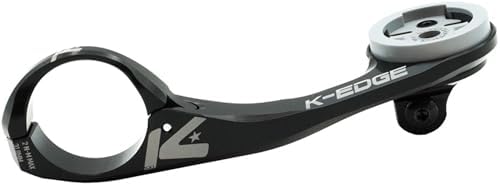
- BUILT FOR XXL COMPUTERS: Engineered to support large cycling computers like the Wahoo ACE or Garmin Edge 1050, the Max X…
- HEAVY-DUTY CNC-MACHINED ALUMINUM: Precision-crafted from aircraft-grade 6061-T6 aluminum in Boise, Idaho, this mount del…
- OPTION FOR CAMERA OR LIGHT ATTACHMENT (COMBO MODEL): The Combo version includes an integrated GoPro-style interface unde…

- ELEMNT BOLT 2
- Built to provide a simple, intuitive ride experience
- Features a 2.2 inch, 64 color screen with ambient light

- Meet TRACKR RADAR, an all-in-one tail light and radar built to keep you aware, visible, and in control. With real-time v…
- Vehicle Detection: Alerts you to approaching cars up to 150m (164 yards) behind. In-Ride Alerts: Real-time notifications…
- Mode Memory: Saves your last-used light mode for convenience between rides. Brake Light: Increases luminosity when braki…
Wahoo Fitness ELEMNT GPS Bundle Review: The Ultimate Co-Pilot for Cyclists?
Every cyclist hits a point where guessing is no longer good enough. You want to know your speed, track your heart rate, measure your cadence, and follow a route without constantly pulling out your phone. The search for the perfect cycling computer can be overwhelming, but the Wahoo Fitness ELEMNT GPS bundle aims to be the all-in-one solution you’ve been looking for. This isn’t just a GPS unit; it’s a complete ecosystem designed to capture every critical metric from your ride, making your training smarter and your adventures more epic.

This review will break down everything this powerful kit offers. We’ll explore the hardware, dive into the famously user-friendly software, and see how it stacks up against the competition. If you’re ready to take your cycling data and navigation to the next level, you’re in the right place.
In a Nutshell
- Complete Data Capture: The bundle includes the GPS computer, a TICKR heart rate monitor, and RPM Speed and Cadence sensors, giving you a full performance picture right out of the box.
- Unmatched Simplicity: Wahoo’s biggest advantage is its incredibly intuitive setup and customization, all managed through the seamless ELEMNT Companion App on your smartphone.
- Powerful Integration: It works perfectly with major platforms like Strava, TrainingPeaks, and Komoot, automatically syncing your rides and structured workouts.
- Cyclist-Focused Design: With features like tactile buttons that work with gloves, high-contrast screens, and customizable QuickLook LEDs, it’s built for real-world riding conditions.
What’s Inside the Wahoo Fitness ELEMNT GPS Bundle? An Unboxing
When you invest in the wahoo elemnt gps kit, you’re getting more than just a head unit. You’re getting a complete data acquisition system designed to work together from the moment you open the box. This bundled approach is one of Wahoo’s smartest moves, as it eliminates the guesswork and extra cost of buying essential sensors separately.
Here’s what you’ll find inside:
- The ELEMNT GPS Computer: This is the brain of the operation. Depending on the bundle you choose, you’ll get either the aerodynamically focused ELEMNT BOLT or the navigation-powerhouse ELEMNT ROAM. Both offer a crisp, easy-to-read screen and Wahoo’s signature user-friendly interface.
- TICKR Heart Rate Monitor: A chest strap monitor that provides highly accurate heart rate data. It’s the gold standard for training by zones and understanding your effort level far better than a wrist-based sensor can.
- RPM Speed Sensor: This small pod mounts to your wheel hub and provides precise speed data, even when your GPS signal is weak (like in tunnels or dense forests). It’s also essential for accurate data when riding on an indoor trainer.
- RPM Cadence Sensor: Attaching to your bike’s crank arm, this sensor measures your pedaling revolutions per minute (RPM). Cadence is a fundamental metric for improving pedaling efficiency and is crucial for structured workouts.

Choosing the Wahoo Fitness bundle is a strategic move. Not only does it typically offer a cost saving compared to buying each item individually, but it ensures you have all the tools to start training seriously from day one. You won’t find yourself a month later realizing you need a cadence sensor for your new training plan—it’s already there.
Core Power: A Deep Dive into the ELEMNT GPS Device Features
The heart of the wahoo fitness gps bundle is, of course, the ELEMNT computer itself. Wahoo has built its reputation on creating devices that are powerful yet incredibly simple to use, and these computers are a perfect example of that philosophy.
One of the most praised features is the display. Wahoo uses high-contrast monochrome (on the BOLT) or color (on the ROAM) screens that are exceptionally easy to read in direct sunlight. They are protected by durable Gorilla Glass, so you don’t have to worry about the occasional knock or scrape. Instead of a touchscreen, Wahoo uses tactile, physical buttons.
This is a deliberate design choice that cyclists love—they are easy to press with gloves on or in wet conditions, providing reliable feedback every time.
Another signature feature is the row of programmable QuickLook LEDs along the top and/or side of the unit. These customizable lights can give you at-a-glance information without you needing to stare at the screen. You can set them to indicate your heart rate zone, power zone, speed relative to average, or provide turn-by-turn navigation cues. It’s a brilliant way to stay in your zone while keeping your eyes on the road.
Finally, the Perfect View Zoom feature is a masterclass in simplicity. Using the side buttons, you can increase or decrease the number of data fields shown on any page, on the fly. Want to see all 9 metrics. No problem.
Need to focus on just your power and heart rate during a hard interval. Just press a button to zoom in, making those numbers huge and easy to read. This level of on-the-go customization is something users consistently rave about.

Wahoo vs. The Competition: How Does It Stack Up?
No discussion of GPS computers is complete without mentioning the elephant in the room: Garmin. For years, Garmin has dominated the market, but Wahoo has carved out a massive following by offering a compelling alternative. The choice between them often comes down to a core philosophy: simplicity versus complexity.
Here’s a quick breakdown of how the Wahoo ELEMNT series generally compares to its Garmin Edge counterparts:
| Feature | Wahoo ELEMNT (BOLT/ROAM) | Garmin Edge (540/840) | Winner |
|---|---|---|---|
| Setup & Ease of Use | Incredibly simple via Companion App | More complex, requires more on-device setup | Wahoo |
| Screen & Readability | High-contrast, excellent in sunlight | Bright color screens, often touchscreen | Tie (User Preference) |
| Navigation | Excellent, straightforward routing | More advanced, with deeper POI integration | Garmin (by a slight margin) |
| App Ecosystem | The ELEMNT Companion App is best-in-class | Garmin Connect is powerful but can be cluttered | Wahoo |
| Battery Life | 15-17 hours, very reliable | 20+ hours, often with power-saving modes | Garmin |
| Advanced Metrics | Covers all essentials (power, HR, etc.) | Offers deeper analytics (Stamina, ClimbPro) | Garmin |
Who is the Wahoo ELEMNT for? The Wahoo ecosystem is perfect for the cyclist who wants a device that just works. If you value a quick, painless setup, an intuitive interface, and a computer that does the essentials flawlessly, Wahoo is your answer. It gets out of your way and lets you focus on the ride.
Who might prefer Garmin? The data-hungry athlete. If you want every metric under the sun, from real-time stamina tracking to detailed climbing analysis and solar charging options, Garmin’s higher-end models offer a depth of features that Wahoo doesn’t try to match.
From Box to Bike: A Simple Setup and Installation Guide
This is where Wahoo truly shines and wins over legions of fans. The setup process for the ELEMNT GPS bundle is so refreshingly simple it makes competitors’ systems feel archaic. You’ll spend less time reading manuals and more time riding.
Here’s the entire process, step-by-step:
-
Charge Everything: Before you start, plug in the ELEMNT computer using the included USB-C cable to make sure it has a full charge. The sensors come with batteries that last for months, so they’re ready to go.
-
Download the ELEMNT Companion App: This is the key. Go to the app store on your iOS or Android phone and download the free Wahoo ELEMNT Companion App. This app is your command center for the entire system.
-
Pair the Computer: Turn on your ELEMNT computer. It will display a QR code. Open the Companion App on your phone, select ‘Pair’, and simply point your phone’s camera at the QR code. That’s it. The computer is now paired to your phone.
-
Install the Sensors:
- TICKR: Put on the chest strap. The computer will automatically detect it.
- RPM Speed: Slide the sensor into its rubber casing and stretch it over the hub of your front or rear wheel. Spin the wheel, and the computer will find it.
- RPM Cadence: Use the included 3M tape or zip ties to attach the sensor to the inside of your non-drive-side crank arm. Rotate the crank, and it will pair instantly.
-
Mount the Computer: The bundle includes both a sleek out-front mount and a simple stem mount. Choose the one you prefer, attach it to your handlebars or stem, and twist the ELEMNT computer into place until it clicks.
From here, you use the Companion App to authorize apps like Strava, customize your data pages by dragging and dropping fields, and configure your settings. The ability to do all of this on your phone’s large screen instead of fiddling with tiny buttons on the device itself is a massive quality-of-life improvement.
Pro Tip: Before your first ride, go into the Companion App and set up your Wi-Fi network. This allows the ELEMNT to automatically upload your rides the moment you walk in the door, so it’s on Strava before you’ve even taken your helmet off.
Navigating Your Ride: User Interface and Mapping
Once you’re set up, using the ELEMNT on a ride is a joy. The user interface is clean and logical. The three main buttons on the front are easy to press and navigate through your pages, start/stop rides, and lap your efforts. The side buttons handle the brilliant Perfect View Zoom, allowing you to tailor your screen’s data density in seconds.
Mapping and navigation are core strengths, especially on the color-screen ELEMNT ROAM. You can create a route in a partner app like Strava or Komoot and have it sync wirelessly to the device. Or, you can use the “Take Me To” feature in the Companion App to type in an address or destination, and it will generate a bike-optimized route and send it to your computer.
During the ride, you get clear, turn-by-turn directions. The on-screen chevrons and pop-up notifications tell you exactly where to go. This is augmented by the QuickLook LEDs, which will flash to alert you of an upcoming turn. If you go off course, the device will automatically try to re-route you back onto your planned path, a feature that works reliably to get you back on track without any fuss.
Wahoo ELEMNT BOLT V2 In-Depth Review
For a visual walkthrough of the device in action, this review from a popular cycling channel on YouTube provides an excellent deep dive into the latest ELEMNT BOLT.
Your Digital Training Hub: App and Platform Integration
A GPS computer today is more than just a device; it’s a gateway to a larger digital ecosystem. The Wahoo Fitness ELEMNT GPS bundle excels at being a reliable and connected hub for all your training data. Its integration with third-party apps is seamless and a major reason why so many athletes choose Wahoo.
The connection with Strava is a highlight. Once you authorize your account, your ELEMNT will automatically pull your favorite Strava routes and sync your Strava Live Segments. As you approach a segment on a ride, the screen switches to a dedicated page showing your progress against your PR, the KOM/QOM, or a friend you’re chasing. The LEDs can even indicate how far ahead or behind you are.
For athletes on a structured training plan, the integration with TrainingPeaks and TrainerRoad is flawless. Your workout of the day automatically appears on the ELEMNT. When you start your ride, it guides you through each interval, telling you the target power and duration. It’s like having a coach on your handlebars.
Beyond that, it connects with almost every platform a cyclist could want: Ride with GPS, Komoot for route planning, Best Bike Split for race pacing, and many more. It also functions as a powerful controller for Wahoo’s own KICKR smart trainers, allowing you to re-ride an outdoor route or execute a structured workout indoors. This connectivity makes the ELEMNT a versatile tool for both indoor and outdoor training.
Going the Distance: ELEMNT GPS Battery Life and Charging
Battery life is a critical factor for any GPS computer, and the ELEMNT series delivers solid, reliable performance. You don’t want your screen dying 80 miles into a 100-mile ride. Wahoo provides very realistic battery life claims that hold up in the real world.
- Wahoo ELEMNT BOLT: Up to 15 hours of runtime.
- Wahoo ELEMNT ROAM: Up to 17 hours of runtime.
These figures are more than enough for all but the most extreme ultra-endurance events. For the vast majority of cyclists, this means you can get through several long rides on a single charge. It’s important to remember that certain features will use more power. Heavy use of the backlight, constant navigation with re-routing, and having many sensors connected can reduce the total runtime slightly, but the performance remains impressive.
Newer models of the ELEMNT computers have been updated with a USB-C charging port, which is a welcome modernization. This means faster charging times and the convenience of using the same cable that likely charges your phone or laptop. A full charge from empty typically takes just a couple of hours, so it’s easy to top up the night before a big ride.

Real Rider Feedback: An Honest ELEMNT GPS Bundle Review
To give a complete elemnt gps bundle review, it’s important to look beyond the spec sheet and consider what actual riders are saying. Across cycling forums, group rides, and product reviews, the feedback on Wahoo’s ecosystem is overwhelmingly positive, and a few key themes emerge.
Pros
- Simplicity is King: This is the most common point of praise. Users love that they can set up and manage their entire device from their phone without ever having to scroll through confusing on-device menus.
- Rock-Solid Reliability: The devices are known for being stable and dependable. They connect to sensors quickly, hold a GPS signal well, and rarely suffer from the software bugs that can sometimes plague more complex devices.
- Crystal Clear Display: Even on the monochrome BOLT, riders rave about the screen’s readability in all light conditions. The ability to zoom in on key metrics is a feature many can’t live without once they’ve used it.
- Excellent Customer Support: Wahoo has built a reputation for being responsive and helpful if users ever encounter an issue, which builds a lot of brand loyalty.
Cons
- Simpler Navigation: While the navigation is very good and easy to follow, Garmin’s higher-end units offer more detailed, colorful maps and a more extensive built-in database of points of interest for on-the-fly exploring.
- Fewer Advanced Metrics: Wahoo focuses on nailing the core metrics perfectly. Power users who want features like Garmin’s ClimbPro or Stamina tracking won’t find them here.
- No Touchscreen: While many see this as a positive, some users who are accustomed to smartphones prefer a touchscreen interface over buttons.
Pro Tips: Getting the Most Out of Your Wahoo ELEMNT Kit
Once you have your wahoo elemnt gps kit, there are a few tricks you can use to elevate your experience from great to amazing.
-
Customize Pages for Ride Types: Don’t stick with one data layout. Use the Companion App to create different profiles. Make a ‘Race Day’ page with just Power, Heart Rate, and Time. Create an ‘Exploring’ page focused on the map and elevation. Have a ‘Training’ page for your structured workout intervals.
-
Use LEDs for Training Zones: Go beyond navigation cues. Set up the QuickLook LEDs to represent your power or heart rate zones. A quick glance is all you need to see if you’re in your target zone during an interval, without having to focus on the exact number.
-
Enable Live Track: This is a fantastic safety feature. From the Companion App, you can set up Live Track to generate a private link that you can share with a partner or family member. They can follow your progress on a map in real-time, giving both of you peace of mind on long solo rides.
Pro Tip: Pair your ELEMNT with a radar system like the Garmin Varia. The Wahoo screen provides a brilliant visual interface, showing a sidebar that tracks approaching cars from behind. It’s a powerful safety integration that works perfectly within the Wahoo ecosystem.
Investment in Performance: Pricing and Where to Buy
The Wahoo Fitness ELEMNT GPS bundle represents a significant investment, but it’s one that pays dividends in performance, motivation, and enjoyment. The key is to view it not just as a computer, but as a complete training system. When you factor in the cost of a high-quality heart rate monitor and speed/cadence sensors, the bundle almost always presents a better value than buying the components piecemeal.
Pricing will vary depending on whether you choose the ELEMNT BOLT bundle or the more premium ELEMNT ROAM bundle. The ROAM typically costs more due to its color screen and slightly larger size. Prices can also fluctuate based on sales and the retailer.
While you can purchase from various cycling shops, one of the most convenient places is often online. For the most up-to-date pricing and availability, you can check it out directly on Amazon. This ensures you’re seeing the current market rate and can get it shipped right to your door.
Ready to upgrade your ride? Check the current price for the Wahoo Fitness ELEMNT GPS Bundle on Amazon.
Frequently Asked Questions (FAQ)
Is the Wahoo ELEMNT bundle waterproof?
Yes, absolutely. All Wahoo ELEMNT computers have an IPX7 waterproof rating. This means the device can be submerged in up to 1 meter of water for 30 minutes. In real-world terms, it’s more than capable of handling the heaviest rainstorms, puddles, and post-ride hose-downs without any issues.
Can I use the Wahoo ELEMNT with non-Wahoo sensors?
Yes. This is a major advantage of the Wahoo ecosystem. The ELEMNT computers support both ANT+ and Bluetooth Smart sensor connections, which are the industry standards. This means you can pair them with virtually any third-party power meter, heart rate monitor, or other sensor that uses these protocols.
Wahoo ELEMNT BOLT vs. ROAM: Which one should I get?
This choice comes down to your primary riding style. The ELEMNT BOLT is smaller, lighter, and designed with aerodynamics in mind, making it a favorite among racers and performance-focused riders. The ELEMNT ROAM has a larger color screen and more advanced navigation features, making it the better choice for cyclists who love exploring new roads, bikepacking, or who simply want the best mapping experience.
Does the Wahoo ELEMNT have a touchscreen?
No, Wahoo ELEMNT computers do not have a touchscreen. They use tactile physical buttons for all interactions. This is a deliberate design choice, as buttons are more reliable and easier to use with gloves or in wet and sweaty conditions, preventing accidental swipes and presses.
Final Verdict: Is the Wahoo Fitness ELEMNT GPS Bundle for You?
After a thorough review, the verdict is clear: the Wahoo Fitness ELEMNT GPS bundle is a phenomenal package for a huge range of cyclists. It strikes an almost perfect balance between powerful features and incredible ease of use. If you’re a rider who wants to capture all the essential data without getting bogged down in a complex and frustrating user interface, this is the system for you.
It’s the ideal choice for the enthusiast cyclist, the dedicated amateur racer, the data-curious adventurer, and anyone who believes technology should make life easier, not more complicated. The seamless app integration, reliable performance, and thoughtful, cyclist-centric design make it a joy to use on every single ride.
If you’re a professional athlete who needs the absolute deepest level of performance analytics, you might be tempted by a top-tier Garmin. But for everyone else, Wahoo offers all the power you need in a much more elegant and user-friendly package. It’s a fantastic investment that will help you train smarter, explore further, and fall even more in love with cycling.
If you’re ready to stop guessing and start training with precision, the Wahoo Fitness ELEMNT GPS Bundle is an outstanding choice.