



About Best High Tech Gadgets For Adults: Best High Tech Gadgets For Adults is your trusted source for cutting-edge technology insights and solutions. High Tech Gadget Reviews We provide reliable, well-researched technology content to keep you informed and help you make better decisions. This content focuses on What is a key feature of a smart thermostat and related topics.

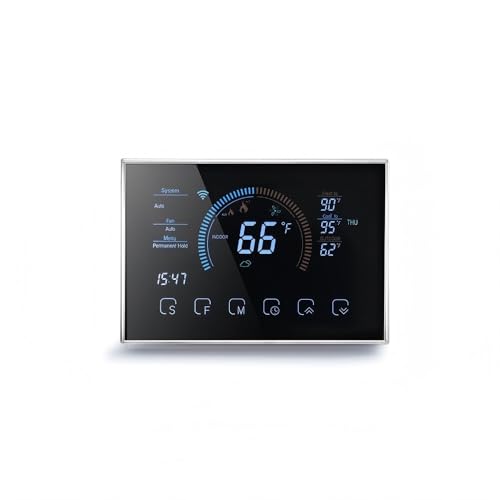
If you are wondering what features matter most in a smart thermostat, start with this core idea: intelligent automation that actively reduces energy use without sacrificing comfort. Put simply, the defining feature is a thermostat’s ability to learn your routine, sense occupancy, and adjust temperatures proactively to save money and keep you comfortable. Think of it like a co-pilot that not only reads the cabin temperature but also predicts traffic and adjusts your route. When that learning engine is paired with accurate sensors and clear controls, you get measurable savings, fewer manual tweaks, and a calmer home climate.
What features matter most in a smart thermostat?
The heartbeat of a modern thermostat is adaptive intelligence that tunes heating and cooling to your life. A strong model recognizes patterns, uses geofencing powered by your phone’s GPS (global positioning system), and ramps temperatures at the right moment so rooms feel right on time. Many certified devices report average heating and cooling savings in the 8 to 15 percent range according to utilities and the United States Environmental Protection Agency (EPA), and your actual results depend on climate, home insulation, and your habits. Beyond brains, you need solid basics: reliable Wi-Fi (wireless fidelity), wide HVAC (heating, ventilation, and air conditioning) compatibility, simple apps, and transparent energy reports that reveal what changed and why.
To make the most of that intelligence, look for room sensors that detect presence and temperature in the spaces you use most. If the nursery runs cooler than the hallway, a sensor can shift the target for true comfort where it counts. Add geofencing so the system eases back when you leave and prepares your home before you return. Finally, seek robust privacy controls, frequent firmware updates, and power options such as a C-wire (common wire) or dependable battery backup so your schedule stays safe even during brief outages.
- Adaptive learning and occupancy sensing for timely preheating and precooling
- Geofencing via GPS (global positioning system) to avoid conditioning an empty home
- Room sensors for temperature balance and comfort where you sit and sleep
- Clear energy reports with weekly trends and actionable suggestions
- Strong Wi-Fi (wireless fidelity) connectivity and voice assistant support
- Wide HVAC (heating, ventilation, and air conditioning) compatibility including heat pumps
- Privacy tools, local schedules, and regular over-the-air (OTA) updates
Energy intelligence you can measure: learning, recovery, and real savings
The smartest thermostats do more than hold a number; they shape your home’s temperature curve. Adaptive learning tracks how quickly your home warms and cools, then starts earlier to hit your target right when you wake or arrive. This is often called adaptive recovery or preheating and precooling, and it can be the difference between stepping into a chilly kitchen or a cozy one without wasting energy overnight. Independent program data from utilities and the United States Department of Energy (DOE) point to meaningful savings from smarter scheduling and setbacks, commonly near 8 percent annually on combined heating and cooling, with higher gains in extreme climates.
Energy reports turn those savings into insight. You might see that a two-degree setback during work hours cuts monthly usage by several kWh (kilowatt-hour) while keeping comfort steady thanks to adaptive recovery. If the system notices unusually long run-times, it can suggest filter checks or hint at a failing component long before a pricey breakdown. That is preventive care for your HVAC (heating, ventilation, and air conditioning) system. And when available, demand response programs coordinated by utilities can nudge your setpoint during peak events in exchange for bill credits, a feature that is usually optional and under your control.
| Feature | How it works | Why it matters | What to check |
|---|---|---|---|
| Adaptive learning | Models your home’s heat/cool rate and your routine | Hits the right temp at the right time with less energy | Supports variable schedules, recognizes holidays, easy overrides |
| Geofencing | Uses phone GPS (global positioning system) to infer home or away | Stops conditioning empty rooms, resumes before arrival | Adjustable radius, multi-user support, privacy disclosures |
| Energy reports | Summarizes run-time, setpoints, and weather impact | Turns data into actions that reduce bills | Weekly and monthly views, export options, plain-language tips |
| Demand response | Voluntary utility events with mild setpoint changes | Earns credits and supports grid stability | Opt-in controls, clear event notifications, easy opt-out |
Seamless control: apps, voice, and smart home integration
A smart thermostat should feel effortless from day one. That means a clear mobile app, quick setup, and dependable connectivity over Wi-Fi (wireless fidelity) on your home network. For many households, voice control is more than a novelty; it is accessibility and convenience. Voice assistants can change setpoints, start routines, or announce indoor humidity while your hands are busy. If you use other connected devices, look for open integrations through standard protocols or services such as IFTTT (If This Then That) and well-documented APIs (application programming interfaces) so your thermostat can participate in scenes, automations, and safety workflows.
Integration adds value when it is purposeful. A window sensor can pause cooling if someone leaves the patio door open for fresh air. A smart lock can signal your arrival without relying solely on phone location, improving geofencing in dense urban buildings. Even fitness devices can inform routines; if you start a late-night indoor ride, a brief precooling can keep your workout comfortable without running the system all night. The best setups are simple first, then grow as your home evolves, so choose a thermostat that plays nicely with the rest of your ecosystem without forcing you into a single brand.
| Integration capability | Everyday use case | Privacy and reliability notes |
|---|---|---|
| Voice assistant control | Hands-free setpoint changes and status checks | Confirm mute options and on-device processing when possible |
| IFTTT (If This Then That) or scenes | Lower setpoint when you start a movie night scene | Review app permissions and automation history logs |
| Open APIs (application programming interfaces) | Custom automations with your home hub | Look for token-based access and role-based permissions |
Comfort by design: sensors, zoning, and indoor air quality


Comfort is local. A hallway thermostat cannot know that your bedroom runs 2 degrees warmer after sunset or that your home office overheats on sunny afternoons. Remote room sensors fix that by measuring where you live, work, and rest, then prioritizing comfort in those spaces. Occupancy-aware sensors can shift focus as you move through the home, while averaging across several rooms avoids overcompensation. If your home has multiple dampers or zones, choose a thermostat that can coordinate them or work with your existing zoning controller, so each space reaches the right setpoint without fighting neighboring rooms.
Indoor air quality also belongs on your shortlist. A thermostat that monitors humidity can bring relief in summer by coordinating mild dehumidification, which often feels cooler at the same temperature. In winter, a gentle humidity boost helps with dry skin and static while protecting wood furnishings. Some thermostats can also prompt filter changes, coordinate with a whole-home ventilator, or display indoor air quality scorecards from connected monitors. These are quiet features you will feel more than notice, the ones that make homes more livable rather than simply more connected.
| Comfort feature | What it does | Benefit at home | Tip to evaluate |
|---|---|---|---|
| Remote room sensors | Measure temperature and presence in key rooms | Comfort where you are, not just the hallway | Battery life, pairing range, per-room scheduling |
| Zoning support | Coordinates dampers or multiple zones | Even temperatures across floors and wings | Compatibility with existing zone controllers |
| Humidity management | Controls dehumidification or humidification cycles | Comfort at lower setpoints and better winter air | Displays indoor humidity and sets target ranges |
Compatibility and installation: the practical foundation
Before falling in love with features, verify compatibility. Thermostats must speak the language of your HVAC (heating, ventilation, and air conditioning) system, whether it is a single-stage furnace, a multi-stage setup, or a heat pump with auxiliary heat. Many homes need a C-wire (common wire) to power advanced features and maintain a strong connection without frequent battery swaps. If you do not have a C-wire, some thermostats include power adapters that add a leg without rewiring the whole system. Keep in mind that reliable power supports better Wi-Fi (wireless fidelity) and more accurate sensor readings over time.
Network stability matters too. If your router broadcasts both 2.4 GHz (gigahertz) and 5 GHz (gigahertz) bands, confirm which your thermostat supports. A 2.4 GHz (gigahertz) connection typically offers better range through walls, while 5 GHz (gigahertz) can be faster at close range. During installation, label wires carefully and photograph the old connections so you can revert if needed. If you prefer professional help, consider a certified technician who can also evaluate ductwork and airflow, because a smart thermostat shines brightest when the mechanical side is in good shape.
| HVAC (heating, ventilation, and air conditioning) compatibility checklist | What to verify |
|---|---|
| System type | Single-stage, multi-stage, heat pump, boiler, or radiant |
| Auxiliary heat | Support for emergency heat and defrost cycles on heat pumps |
| Power | C-wire (common wire) present or approved power adapter |
| Fan control | Manual fan runtime options for circulation and filtration |
| Sensors | Room sensor support, number of sensors, range |
Reliability, privacy, and security: the quiet essentials
When people ask what is a key feature of a smart thermostat, reliability is the unsung hero. Schedules should run locally so a brief internet outage does not leave your home at the wrong temperature. Look for automatic firmware updates, clear release notes, and the option to revert a change if something misbehaves. Power loss behavior matters too; after an outage, your thermostat should gracefully resume its last schedule without user intervention. These are the invisible moments that build trust in daily use.
Privacy and security deserve equal attention. Many thermostats support encryption such as TLS (Transport Layer Security) and offer account protections like multi-factor authentication. You should be able to see what data is collected, why it is collected, and how to delete it. If you use location-based features such as geofencing, check for multi-user support so your partner arriving home does not leave the house stuck in away mode. Finally, confirm you can export your energy data, because owning your data means you can analyze trends in your favorite spreadsheet or share it with a home energy audit when you are ready to go deeper.
- Local schedules and manual overrides for offline resilience
- Transparent data policies and easy data deletion
- Encryption with TLS (Transport Layer Security) and multi-factor authentication
- Regular over-the-air (OTA) updates with readable change logs
- Multi-user geofencing and role-based app permissions
How to choose confidently: a feature-first checklist

Choosing a thermostat should feel empowering, not confusing. Start by mapping your goals, then match each goal to a feature that delivers. If your priority is lower bills without micromanaging, adaptive learning, geofencing, and energy reports belong at the top. If you crave comfort in specific rooms, prioritize remote sensors and zoning. For renters and DIY (do it yourself) enthusiasts, look for battery-powered options, guided setup, and reversible installation. Throughout your research, remember that the best thermostat is the one that fits your system, your routines, and your privacy preferences, not a one-size-fits-all spec sheet.
This is where High Tech Reviews shines. Our in-depth gadget reviews and comparisons break down features in plain language, with expert commentary on trending high-tech tools and comprehensive guides for smart home and fitness devices. We focus on practical value, walk through setup steps, and surface real-world tips gathered from long-term testing. Because consumers often struggle to find reliable information, we highlight product details and curated recommendations that help you make informed decisions and discover the best technology solutions for your lifestyle, from smart thermostats to travel and lifestyle accessories that complement a connected home.
| Your goal | Feature to prioritize | Why it helps | Quick test |
|---|---|---|---|
| Cut energy bills | Adaptive learning, setbacks, energy reports | Automates efficient run-time without constant tweaking | Review a sample monthly report before buying |
| Room-by-room comfort | Remote sensors, zoning coordination | Targets spaces you use, smooths hot and cold spots | Confirm sensor battery life and pairing range |
| Easy daily use | Clear app design, voice control | Fast adjustments and helpful status at a glance | Check demo mode or screenshots of the app |
| Data ownership | Export options, privacy dashboard | Analyze trends and retain control over your data | Look for CSV export or API (application programming interface) access |
| Stable connectivity | Strong Wi-Fi (wireless fidelity), C-wire (common wire) | Fewer dropouts and consistent performance | Verify router band support and power requirements |
Real-world snapshots: how smart thermostats help different lifestyles
Consider a traveling professional who leaves Monday morning and returns Thursday night. With geofencing and occupancy sensing, the thermostat eases back to an efficient away setpoint, then preheats before touchdown so the home feels welcoming on arrival. Energy reports reveal that shifting from a fixed schedule to geofencing saved 11 percent in cooling during summer, mostly by avoiding midday run-time in an empty home. That is real money and less wear on the HVAC (heating, ventilation, and air conditioning) system.
Now picture a fitness-focused household. Late evening workouts in a spare room make it stuffy despite a reasonable setpoint. A remote sensor in the workout room nudges the system to cool just before the session starts, then returns to a higher setpoint afterward, keeping comfort without running the system longer than needed. Over a month, the household notices steadier sleep and a small reduction in kWh (kilowatt-hour) consumption because the main space does not get overcooled to compensate for the hot spot. Smart can be subtle but meaningful.
Expert tips to get the most from your thermostat on day one
Set your initial schedule, then let the learning engine adapt over a week or two. Use moderate setbacks, like 3 to 5 degrees during work hours, and allow adaptive recovery to hit your target before you arrive. Place at least one remote sensor in your most used room and one in your coolest or warmest room to balance comfort. Enable geofencing but add a small delay so quick errands do not trigger unnecessary changes.
Turn on energy reports and actually read them every week. Look for run-time spikes that align with weather, doors left open, or filter issues. Keep privacy balanced by enabling only the permissions you truly need and reviewing them twice a year. Finally, update firmware when prompted and skim the release notes; even small improvements can make the system feel faster, safer, and smarter over time.
How High Tech Reviews helps you decide with confidence
At High Tech Reviews, we translate spec sheets into everyday outcomes so you can see how features show up in real life. Our in-depth gadget reviews and comparisons explain schedule learning, geofencing, room sensors, and privacy tools with clear examples, not jargon. You will also find comprehensive guides for smart home and fitness devices that integrate with thermostats, plus a curated selection of travel and lifestyle accessories that make your routines smoother. Because consumers often struggle to find reliable information, our expert commentary and product highlights focus on the trade-offs that matter, the steps to verify compatibility, and the settings that unlock comfort and savings.
When you need to know what features matter most in a smart thermostat, we provide side-by-side feature breakdowns, setup walkthroughs, and real-world testing notes so you can match a device to your home, schedule, and privacy preferences. The goal is simple: help you make informed purchasing decisions and discover the best technology solutions without the noise.
Smart thermostats shine because they intelligently automate comfort and savings while keeping you in control. In the next 12 months, expect faster learning, richer local processing, and tighter links with sensors and clean energy programs. What would your ideal daily routine look like if your home climate quietly anticipated each moment and focused on what features matter most in a smart thermostat?
Additional Resources
Explore these authoritative resources to dive deeper into what features matter most in a smart thermostat.
Decode What Features Matter Most in a Smart Thermostat with High Tech Reviews
Adults and tech-savvy consumers get expert reviews, product highlights, and curated picks to make confident decisions and discover top tech solutions through in-depth gadget reviews and comparisons.



What services does Best High Tech Gadgets For Adults provide?
Best High Tech Gadgets For Adults provides practical technology solutions designed around customer needs. Our team focuses on clear communication, reliable support, and outcomes that help people make informed decisions quickly.
How can customers get help quickly?
Customers can contact our team directly for fast support, clear next steps, and timely follow-up. We prioritize responsiveness so questions are answered quickly and issues are resolved without unnecessary delays.
Why choose Best High Tech Gadgets For Adults over alternatives?
Customers choose us for trusted expertise, transparent guidance, and consistent results. We focus on practical recommendations, personalized service, and long-term relationships built on reliability and accountability.


