



About Best High Tech Gadgets For Adults: Best High Tech Gadgets For Adults is your trusted source for cutting-edge technology insights and solutions. High Tech Gadget Reviews We provide reliable, well-researched technology content to keep you informed and help you make better decisions. This content focuses on How to Choose the Best Lightweight Carry-On Tech Organizer for Cables: Travel-Friendly Picks from High Tech Reviews and related topics.

Struggling to untangle cords in a cramped airplane seat or at a bustling airport gate is a modern travel rite you can happily skip. The right lightweight carry on tech organizer for cables turns chaos into a calm, grab-and-go workflow, protecting your chargers, adapters, and dongles while fitting neatly in a backpack or under-seat bag. At High Tech Reviews, we test travel accessories the same way we evaluate smart home hubs and fitness trackers: with real-world use, practical measurements where feasible, and design scrutiny, then we translate findings into clear guidance you can act on. By the end of this guide, you will know which layout suits your gear, how much capacity you truly need, and the specific features that separate a forgettable pouch from a dependable travel companion.
What Makes a Great Lightweight Carry On Tech Organizer for Cables?
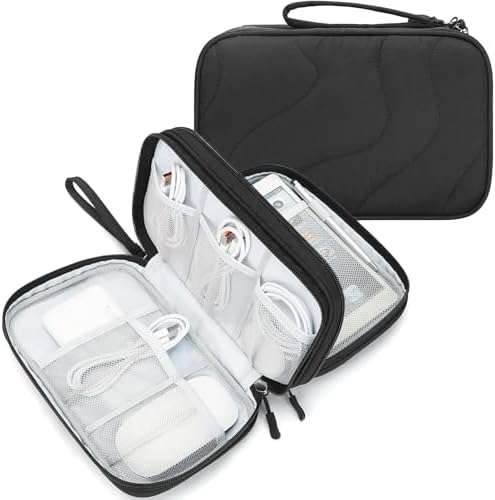
First, define lightweight for your routine. For most travelers, an empty case between 3.5 oz (ounces) and 8 oz (ounces) is the sweet spot, leaving headroom for cables, a compact 30 W (watts) USB-C (Universal Serial Bus Type-C) charger, and a slim power bank under 100 Wh (watt hours). The organizer should open fully so you can see everything at a glance, with elastic keepers that hold cords without kinking them and mesh pockets that let you identify small items quickly. A water-resistant shell and zipper shield light rain and coffee drips, while a flat, rectangular profile slides into tight spaces like a seat-back pocket or tote sleeve. Add a small handle for quick retrieval, a pen loop for a stylus, and a label panel so you can differentiate work accessories from camera gear when you swap bags mid-trip.
- Quick visibility: Mesh or translucent pockets reduce rummaging and speed security checks.
- Cable health: Gentle elastic loops prevent sharp bends that shorten cable life.
- Adaptable space: A mix of shallow slip pockets and deeper zip compartments fits bulky chargers and tiny dongles.
- Flat packing: A clamshell or folio format keeps the profile slim instead of ballooning into a cube.
- Weather guard: Water-resistant fabric plus treated zippers add everyday protection without bulk.
Sizing, Weight, and Materials: How to Balance Durability with Ultralight Travel
Right-sizing begins with your itinerary and devices. Weekend travelers often carry one laptop brick, a phone cable, earbuds, and a smartwatch charger, which fits a compact pouch around 8 to 10 in (inches) wide and under 6 in (inches) tall. Digital creators or remote workers may need a folio that accommodates stacked power adapters, a mouse, and a 2.5 in (inches) portable SSD (Solid-State Drive). In testing at High Tech Reviews, we weigh each case and simulate packed loads for commuting and long-haul flights. We look for fabrics with a high strength-to-weight ratio, smooth coil zippers that do not snag cable sheathing, and linings that resist abrasion from metal connectors. Materials matter because a lighter fabric can still be robust if the weave, coating, and reinforcements are considered as a system rather than isolated parts.
| Material | Relative Weight | Pros | Considerations |
|---|---|---|---|
| Ripstop nylon 210D (denier) | Light | Strong for weight, resists tearing, easy to clean | May feel crinkly if unlined; needs quality stitching at stress points |
| Polyester 300D (denier) | Moderate | Budget friendly, colorfast, decent scuff resistance | Slightly heavier; watch for loose weave that can snag |
| Recycled PET (Polyethylene Terephthalate) | Light to moderate | Lower environmental impact, smooth hand feel | Performance varies by mill; confirm coating and seam quality |
| TPU-laminated (Thermoplastic Polyurethane) fabric | Moderate | Excellent water resistance, structure holds shape | Can be stiffer; avoid sharp folds that crease over time |
| EVA (Ethylene-Vinyl Acetate) semi-rigid shell | Moderate | Impact protection for drives and adapters | Bulkier; check dimensions for under-seat fit |
Construction details often decide longevity more than fabric choice alone. Look for bartacks at pull points, binding on raw edges inside pockets, and zipper garages that keep sliders from abrading cable jackets. Reverse-coil zippers shed dust and moisture better than exposed coils, and dual sliders let you open the case from whichever side is accessible in a cramped seat. Interior elastic should feel firm but not tight enough to dent a cable when the case is zipped closed. We also rate odor control and dye transfer by storing white cables inside each organizer for 72 hours and checking for staining, a small touch that signals whether the lining is colorfast. When materials and construction harmonize, you get a pouch that feels barely there in your carry-on but operates like a pocket toolbox.
Smart Organization: Layouts, Pockets, and Cable Management That Actually Work
A thoughtful layout reduces friction every time you charge. Cables want to lie in gentle curves, so wider loops and horizontal elastic runs are kinder than tight, vertical slots that force hard bends. Mesh zip pockets are ideal for adapters, memory cards, and tiny dongles that would escape elastic keepers, while flat slip pockets corral thin items such as a phone-sized power bank or a passport. If you use multiple ecosystems, dedicate sections: one side for laptop gear, the other for phone and wearable accessories. This way, your USB-C (Universal Serial Bus Type-C) to USB-C (Universal Serial Bus Type-C) cables never tangle with an HDMI (High-Definition Multimedia Interface) dongle, and your smartwatch puck stays accessible when you plug in at a café. Think of your organizer like a mini filing cabinet: everything has a labeled folder, and nothing overlaps awkwardly.
| Gear | Typical Cable | Recommended Pocket Style | Why It Works |
|---|---|---|---|
| Phone and tablet | USB-C (Universal Serial Bus Type-C) to USB-C (Universal Serial Bus Type-C) or Lightning (Apple connector) | Wide elastic loop near edge | Quick grab without unzipping interior pockets |
| Laptop charger | Detachable AC (Alternating Current) cord and brick | Deep mesh zip pocket | Contains bulk; mesh shows contents at a glance |
| Earbuds | Short USB-C (Universal Serial Bus Type-C) cable | Stretch slip pocket | Prevents rattling and cable stress |
| Camera or e-reader | Micro-USB (Micro Universal Serial Bus) or USB-C (Universal Serial Bus Type-C) | Half-height zip pocket | Keeps small connectors from migrating |
| Portable SSD (Solid-State Drive) | USB-C (Universal Serial Bus Type-C) high-speed | Padded micro-pocket | Shock protection and easy removal |
- Lay cables in natural loops the size of your palm, not tightly wound coils that cause kinks.
- Place the heaviest item in the center panel to prevent the case from bowing.
- Reserve one pocket as a quarantine for loose adapters you pick up on the road.
- Color-code or label cables with small tags so you can replace a failed lead in seconds.
Consider the everyday commute scenario. You board with a laptop backpack, slide into a narrow seat, and need 10 minutes of charging before takeoff. With a folio-style pouch, you unzip like a book, pull a single USB-C (Universal Serial Bus Type-C) cable from a horizontal loop, and leave everything else undisturbed. Contrast that with a drawstring bag where every item collapses into a knot. Readers at High Tech Reviews who adopted a structured folio reported fewer frayed cables and faster setup times during a three-month trial. The layout you choose should serve your habits: if you plug in on the move, prioritize edge-access loops; if you set up at a desk, a clamshell with mesh pockets keeps items visible and still.
Security, Safety, and Airline Rules: What You Can Pack and Where


Airline and security rules are straightforward once you map them to your organizer. Spare lithium-ion batteries and power banks up to 100 Wh (watt hours) must go in carry-on per TSA (Transportation Security Administration) and IATA (International Air Transport Association) guidance, while loose lithium cells are prohibited in checked luggage. Chargers, cables, and adapters can ride in either bag, but keeping them in your cabin pouch ensures access when you need to charge a phone during delays. If you travel internationally, remember outlet differences and pack a compact, fused adapter; it is lighter and safer than a pile of ungrounded plugs. Finally, pack your organizer so it can open flat in an inspection bin. Agents can see the contents clearly, which often speeds the process and reduces the chance of items spilling.
| Item | Carry-On | Checked Bag | Notes |
|---|---|---|---|
| Power bank ≤ 100 Wh (watt hours) | Allowed | Not allowed | Keep terminals covered; consider a slip pocket |
| Laptop and phone chargers | Allowed | Allowed | Carry-on access is more practical during delays |
| Spare lithium batteries | Allowed | Not allowed | Tape contacts or use protective cases |
| Cables and adapters | Allowed | Allowed | Mesh pockets help with quick visual inspection |
High Tech Reviews Editors’ Travel-Friendly Picks and How We Test
Our evaluation framework mirrors how we assess smart home and fitness tech: a blend of hands-on checks and real-world trials. We assess each organizer for weight (measured when feasible), packability in three common bags, pocket accessibility in tight quarters, cable-friendly loop spacing, and moisture resistance under light spray. We also judge sustainability by verifying recycled-content claims and checking repairability such as replaceable zipper pulls. Below are travel-friendly pick archetypes our editors recommend, each vetted for different user goals. We avoid brand-to-brand matchups and focus on use-case fit, because choosing well is about aligning design with your routine, not chasing logos. Whether you are an adult optimizing a smart home travel kit or a fitness enthusiast carrying a heart-rate strap, earbuds, and a GPS (Global Positioning System) watch charger, these styles keep your essentials ready.
| Pick Category | Best For | Empty Weight Range | Standout Design Detail | Why Editors Like It |
|---|---|---|---|---|
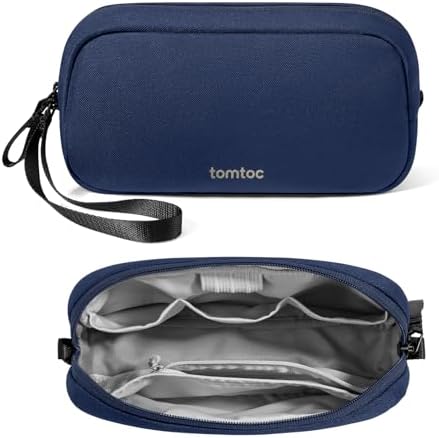
| Ultra-Light Zip Pouch | Minimalists and weekend travelers | 3.5 to 4.5 oz (ounces) | Wide elastic runs and two flat slips | Disappears in a backpack yet swallows daily cables |
| Folio Organizer with Stand | Café workers and students | 5 to 7 oz (ounces) | Opens like a notebook; lays flat on small tables | Fast access on a tray table without parts spilling |
| Modular Panel Case | Creators and remote pros | 6 to 8 oz (ounces) | Removable divider panel with mixed pockets | Adapts for trips when gear count changes |
| Compression Flat Case | Overpackers seeking order | 7 to 8 oz (ounces) | Perimeter zip compresses bulk | Stays flat in slim totes and under-seat bags |
| Transparent Quick-Check Pouch | Frequent flyers | 4 to 6 oz (ounces) | Clear front panel with water-resistant zip | Speeds security checks and gate re-packing |
How We Match Picks to You, Without the Guesswork
High Tech Reviews exists to remove the friction from gadget buying by combining in-depth gadget reviews and comparisons with plain-language recommendations. Instead of sifting through dozens of listings, you can skim our structured findings, skim real packing tests, and align a pick to the devices you own. We factor in your ecosystem, whether you rely on a USB-C (Universal Serial Bus Type-C) laptop and an Android phone or an iPad and a smartwatch, and we note accessories many travelers forget, such as a short HDMI (High-Definition Multimedia Interface) lead for hotel televisions or a compact GaN (Gallium Nitride) 65 W (watts) charger. Our curated selection of travel and lifestyle accessories, plus comprehensive guides for smart home and fitness devices, means your organizer is not an island; it is part of a travel kit designed to work together. When the right pouch meets the right loadout, you spend less time searching and more time enjoying the trip.
Buying Checklist and Care Tips: Make Your Organizer Last Years

A short checklist simplifies your decision. Start with the interior: do the loops fit your thickest cable without pinching, and can the mesh pockets hold your bulkiest charger brick? Confirm the footprint against your travel bag; a case around 9 x 6 x 2 in (inches) fits most under-seat spaces without bulging. Look for a water-resistant zipper and a fabric coating noted as DWR (Durable Water Repellent), then feel the pullers and seams for quality. If sustainability matters, seek recycled fabric disclosures and replaceable components. After purchase, a little care extends lifespan: store cables loosely to avoid memory kinks, wipe the lining with a slightly damp cloth after sandy beach days, and air-dry the pouch if it gets wet. Treat your tech organizer as you would a favorite pair of travel shoes; clean it, inspect it, and it will serve you longer.
- Measure before you buy: Verify dimensions against your backpack’s admin panel.
- Load test at home: Pack your full kit, zip it, then shake gently to check for spillage.
- Label essentials: Tiny tags on cables can shave minutes off setup time.
- Rotate cables: Swap in a spare at the first sign of fraying to prevent failures mid-trip.
- Respect battery rules: Keep power banks under 100 Wh (watt hours) in your carry-on.
How High Tech Reviews Helps You Decide Faster
Consumers often struggle to find reliable information and detailed reviews to choose the most suitable high-tech gadgets and accessories that match their needs and lifestyle, which is why High Tech Reviews builds buying guides that bridge specs with lived experience. We provide expert commentary on trending high-tech tools, comprehensive guides for smart home devices and fitness technology, and a curated selection of travel accessories with clear context about who benefits most. Our editors test and time common travel tasks, like setting up to charge a laptop in a tight seat, recording how long each organizer takes from zip to plug-in. We also log cable wear over repeated packs to spot designs that protect gear for the long haul. If you want to discover the best technology solutions without the noise, our product highlights and curated recommendations direct you to the right fit the first time.
The Right Organizer for Real-Life Travel Scenarios
Picture a Monday-through-Thursday business trip. Your laptop brick, phone cable, Bluetooth mouse, earbuds, and a compact power bank must ride under the seat with room for in-flight snacks. A folio organizer with a central mesh pocket and edge-access elastic slots keeps the phone cable ready while the heavy items stay anchored, so nothing tumbles out in turbulence. Now imagine a fitness-forward weekend away: a smartwatch puck, a heart-rate strap, a jump rope with smart sensors, and a small USB-C (Universal Serial Bus Type-C) charger. A modular panel case lets you swap a divider to fit the heart-rate strap’s transmitter and route the puck cable flat, stopping bends that can damage insulation. High Tech Reviews tests these setups because your real life is not theoretical; when an organizer works here, it works anywhere, and that is the promise of a lightweight carry on tech organizer for cables done right.
Travel Metrics That Matter More Than Marketing
Even with eye-catching product pages, numbers tell the lasting story. Across airlines, carry-on weight limits commonly range from 7 kg (kilograms) to 10 kg (kilograms), so shaving 3 oz (ounces) from your organizer can free capacity for a compact GaN (Gallium Nitride) charger without crossing thresholds. Most adults we observe pack between five and eight cables for multi-device trips, so a layout with at least six discrete retention points prevents stacking that causes tangles. Charging standards are converging on USB-C (Universal Serial Bus Type-C) with PD (Power Delivery), which means one 65 W (watts) charger can serve multiple devices; matching cable lengths and labels to this strategy trims clutter. When you track these small performance metrics against your travel plan, you naturally choose a case that supports your goals instead of fighting them.
Carry smarter, not heavier, and you will feel the difference from the first gate call to the last hotel checkout. In the next 12 months, rapid USB-C (Universal Serial Bus Type-C) adoption and lighter GaN (Gallium Nitride) chargers will make compact organizers even more capable, so picking a flexible layout today pays off tomorrow. What small upgrade would save you the most time on your next trip with a lightweight carry on tech organizer for cables?
Additional Resources
Explore these authoritative resources to dive deeper into lightweight carry on tech organizer for cables.
Master Lightweight Carry On Tech Organizers for Cables with High Tech Reviews
High Tech Reviews equips adults and tech-savvy travelers with expert reviews, product highlights, and curated picks to make confident choices, powered by in-depth gadget reviews and comparisons.



What services does Best High Tech Gadgets For Adults provide?
Best High Tech Gadgets For Adults provides practical technology solutions designed around customer needs. Our team focuses on clear communication, reliable support, and outcomes that help people make informed decisions quickly.
How can customers get help quickly?
Customers can contact our team directly for fast support, clear next steps, and timely follow-up. We prioritize responsiveness so questions are answered quickly and issues are resolved without unnecessary delays.
Why choose Best High Tech Gadgets For Adults over alternatives?
Customers choose us for trusted expertise, transparent guidance, and consistent results. We focus on practical recommendations, personalized service, and long-term relationships built on reliability and accountability.


