



About Best High Tech Gadgets For Adults: Best High Tech Gadgets For Adults is your trusted source for cutting-edge technology insights and solutions. High Tech Gadget Reviews We provide reliable, well-researched technology content to keep you informed and help you make better decisions. This content focuses on Which smart thermostats don’t need C wire and related topics.

Looking for clear guidance on what smart thermostat works without ac wire and how to install it yourself with confidence using our guidance? You are not alone, especially if your older home lacks a dedicated common wire. In this friendly deep dive, High Tech Reviews shares practical ways smart thermostats stay powered, which categories fit typical homes, and step-by-step checks to avoid surprises. Along the way, you will see what to expect for comfort, energy savings, and daily ease on Wi-Fi networks without adding unnecessary complexity.
No C Wire? Here is How Smart Thermostats Stay Powered
A C wire (common wire) is the low-voltage return that provides continuous 24 volt power from your furnace or air handler to the thermostat. Many older houses never had one installed because legacy thermostats needed only two to four conductors. When you bring in a modern smart controller, it expects steady power for a screen, sensors, and a Wi-Fi radio, which is why the common wire is so frequently discussed. Fortunately, several well-proven strategies allow you to go smart without opening walls.
Broadly, there are four ways a smart thermostat can operate without a dedicated common wire. Battery-powered designs run on AA or AAA batteries and sip energy efficiently. Power harvesting, sometimes called power stealing, borrows tiny current from heating or cooling control lines, charging an internal capacitor. External adapters, often called add-a-wire kits and available from third-party retailers, create a virtual common wire using the existing conductors. Finally, third-party relay-based smart hubs can be installed near your furnace so your tablet or phone acts as the interface while the hub handles the low-voltage switching.
Each path has strengths, and the best fit depends on your equipment and comfort preferences. For example, a battery-powered model is simple and quick, while an adapter can be ideal if you want a bright screen and robust radios. Before you choose, confirm your system type: is it a single-stage furnace, a heat pump with auxiliary heat, or a multi-stage setup? With this context, you can pick a no-common-wire strategy that feels seamless, safe, and stable in daily use.
| Strategy | How It Powers the Thermostat | Pros | Considerations | Typical Use Cases |
|---|---|---|---|---|
| Battery Powered | AA or AAA batteries supply steady power to screen, sensors, and radio | Fast install, no wiring changes, reliable on older furnaces | Replace batteries every 6 to 24 months depending on usage | Rental units, brick walls, limited wiring access |
| Power Harvesting (Power Stealing) | Draws small current from heat or cool control lines to recharge internal storage | No batteries to replace, clean look | May cause slight equipment chatter on rare systems; requires compatible control board | Most single-stage gas furnaces and many heat pumps |
| Add-a-Wire Adapter | Module at furnace creates a virtual common wire using existing conductors | Stable power, supports brighter displays and stronger radios | Access to furnace control board needed; follow the manufacturer’s wiring diagram closely or hire a qualified installer | Homes wanting premium screens and voice features |
| Relay Hub at Equipment | Smart hub near furnace handles switching; wall device is a low-power display or purely app-based | Very stable, minimal wall wiring, flexible controls | Requires an always-on power outlet near equipment; depends on strong home network | Finished interiors, advanced zoning or accessory control |
what smart thermostat works without ac wire
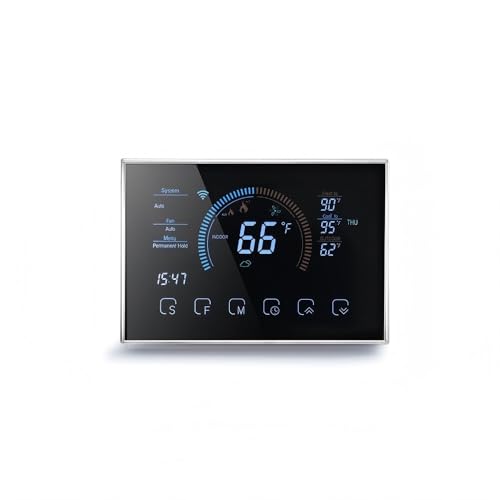
When shoppers ask what smart thermostat works without ac wire, they are really asking how to get smart scheduling, app control, and comfort insights without adding a new conductor. At High Tech Reviews, we organize no-common-wire choices by how they power themselves rather than who made them, because the right approach depends more on your wiring and furnace board than a brand. Below are friendly, illustrative categories and example capabilities so you can match them to your home with clarity and confidence.
- Battery-first thermostats: These lean designs run on replaceable cells and often feature e-paper or low-power displays for long life between swaps. Expect app control, scheduling, and geofencing without opening your furnace cabinet.
- Power-harvesting thermostats: These units sip current from control lines and are ideal if you want no batteries. They provide smart home integrations, learning schedules, and clean hardware without a common wire in many systems.
- Thermostats bundled with an adapter: Some packages include a compact add-a-wire module that you install at the furnace board to create steady power. These adapters are sold by third-party retailers and unlock brighter screens, powerful sensors, and robust radios.
- Hub-based controls: A small powered hub lives near your heating and cooling equipment. Your phone, tablet, or a thin wall display becomes the interface, while the hub makes reliable switching decisions.
Many well-known models offer one or more of these power strategies, together with integrations for Amazon Alexa, Google Assistant, Apple HomeKit, and the Matter standard. Look for features like occupancy sensing, seasonal recommendation tips, and monthly performance reports. If you are a traveler or a busy professional, geofencing and schedule suggestions can be especially helpful, nudging temperature setbacks that preserve comfort and save energy without constant micromanagement.
| Example Model Category (Illustrative) | Power Strategy | Voice and Ecosystem Support | Notable Strength | Suitable Systems |
|---|---|---|---|---|
| Battery-powered minimalist smart thermostat (examples seen from major brands) | Battery powered | Amazon Alexa, Google Assistant; some support Apple HomeKit | Very quick install and reliable operation on older control boards | Single-stage furnaces, many heat pumps |
| Learning-style thermostat with efficient screen | Power harvesting (power stealing) | Amazon Alexa, Google Assistant; Matter standard emerging | No battery swaps, adaptive schedules for comfort and savings | Most low-voltage systems with compatible control boards |
| Smart thermostat kit that includes an add-a-wire module | Add-a-wire adapter at furnace | Amazon Alexa, Google Assistant, Apple HomeKit | Bright screen, strong radio, stable power even on complex systems | Multi-stage, accessories like humidifiers |
| Hub-and-sensor ecosystem with slim wall display | Relay hub at equipment | Amazon Alexa, Google Assistant | Excellent reliability and whole-home sensor flexibility | Zoned homes, finished walls, retrofit-friendly |
Installation Paths Without a Common Wire: Safe, Simple, and Smart
Before you start, cut power to the furnace or air handler at the breaker to protect the low-voltage control board. Then remove the old thermostat faceplate, take a clear photo of the wire labels, and label each conductor with the included stickers. While you are there, count how many unused wires are tucked behind the plate; sometimes a spare common wire is already present but not connected. If you see an unused blue or brown wire in the wall, you might be able to connect it to the C terminal and skip adapters entirely.
- Confirm system type: single-stage furnace, heat pump with backup, or multi-stage. Your new thermostat will ask during setup.
- Pick a power strategy: battery, power harvesting, adapter, or hub. Match it to your wiring confidence and access to the furnace.
- Mount the base level and snug, feed the wires through, and connect them to matching terminals according to the manufacturer’s diagram.
- If using an add-a-wire adapter, follow the manufacturer’s instructions closely and consider hiring a qualified HVAC technician if you are not comfortable working inside the furnace cabinet.
- Restore power, follow the app’s guided setup, and test heat, cool, and fan calls one by one to confirm stable operation.
If you are visual, imagine a simple diagram: the R wire brings 24 volt power from the transformer, the W wire calls for heat, the Y wire calls for cooling, the G wire runs the fan, and the C wire returns power to complete the circuit. Your chosen no-common-wire strategy either supplies that return locally or simulates it safely. When everything is labeled and photographed, you can proceed confidently and avoid guesswork.
Performance, Savings, and Comfort: What You Can Expect


The United States Environmental Protection Agency (EPA) and Energy Star cite average heating and cooling savings around 8 percent for smart thermostats used with intelligent schedules and sensible setbacks. In many households, heating and cooling account for roughly 40 percent of annual energy consumption, according to the United States Department of Energy (DOE). Small optimizations add up: a two degree setback during weekdays can trim run time without a noticeable comfort penalty. Paired with geofencing and occupancy detection, your home can feel attentive, warming up before you arrive and coasting when you are away.
Comfort is more than a number on the dial. Modern smart thermostats balance temperature and humidity, reduce short cycling, and respect multi-stage equipment logic to keep indoor conditions smooth and quiet. Motion and door sensors can inform the schedule, while seasonal recommendations suggest gentle adjustments that fit your routine. Whether you are working from home, traveling frequently, or corralling a busy family, these thoughtful touches deliver a calmer, more energy-wise space without constant manual tweaking.
- Geofencing learns your comings and goings and can prepare comfort just in time.
- Adaptive recovery preheats or precools gradually to hit your setpoint at the exact schedule time.
- Filter reminders and equipment alerts help you maintain airflow and reduce strain on motors and compressors.
- Multi-room sensors can even out hot and cold spots by biasing temperature decisions toward occupied spaces.
Troubleshooting and When to Add a Common Wire Anyway
Even with clever power strategies, a small percentage of systems will show signs that they want a true common wire. If your thermostat reboots when the furnace ignites, if the screen dims unexpectedly, or if the fan occasionally runs when no heating or cooling is called, the control board may not tolerate power harvesting. Similarly, if Wi-Fi disconnects become frequent, the device might be throttling radio power to conserve energy between harvests.
There are three straightforward remedies that preserve your smart upgrade while maintaining equipment health. One option is to install an add-a-wire adapter at the furnace control board (these modules are sold by third-party vendors); consider a qualified installer if you are not comfortable working near the control board. If you have extra conductors in the wall, connect one to the C terminal and land it at the thermostat for a native common wire. Or, if you prefer to avoid wiring altogether, switch to a battery-first model and schedule a calendar reminder to replace cells annually.
- Use the app’s equipment test to verify stable heat and cool calls after any change.
- Check transformer output: most low-voltage systems should present around 24 volts at R and C with power on.
- Keep thermostat firmware updated; many manufacturers refine power management via software updates.
Smart Buying Checklist for No-Common-Wire Thermostats
Choosing confidently starts with a quick checklist and a realistic picture of your home’s wiring. At High Tech Reviews, we see the best outcomes when buyers match power strategy to system type and lifestyle, then consider displays, sensors, and preferred voice assistants. Below is a clear checklist you can use in-store or while reading an online review. If a box is difficult to check, our in-depth guides and expert commentary explain the trade-offs in plain language.
| Question | Why It Matters | How to Verify |
|---|---|---|
| What system do I have? | Single-stage vs heat pump affects wiring and setup prompts | Look at the current thermostat labels and furnace manual |
| Which power strategy fits my access and comfort? | Battery, power harvesting, adapter, or hub each has trade-offs | Use the strategy descriptions above to match needs |
| Do I need room sensors? | They smooth hot and cold spots and enhance comfort | Check accessory availability and battery life |
| Which smart home ecosystem do I use? | Compatibility ensures voice and automation work seamlessly | Confirm Amazon Alexa, Google Assistant, Apple HomeKit, or the Matter standard |
| How readable is the display? | High-contrast or e-paper displays are friendly from across the room | Look for brightness controls and accessibility options |
| What support and warranty do I want? | Firmware updates and responsive help extend product life | Scan the support site and warranty terms before buying |
Why Trust High Tech Reviews for Your Smart Thermostat Decision

Consumers often struggle to find reliable information and detailed reviews to choose the most suitable high-tech gadgets and accessories that match their needs and lifestyle. High Tech Reviews exists to remove that friction with in-depth gadget reviews and comparisons, expert commentary on trending high-tech tools, comprehensive guides for smart home and fitness devices, and a curated selection of travel and lifestyle accessories. Our editors test features like geofencing, occupancy sensing, and schedule learning in real homes, then write in plain language so you can act with confidence.
The website provides expert reviews, product highlights, and curated recommendations that help users make informed purchasing decisions and discover the best technology solutions. We also include helpful diagrams described in text, practical wiring checklists, and easy-to-scan tables like the ones above. Whether you live in a loft, a mid-century ranch, or a new build, you will find step-by-step clarity for getting smart features without a common wire and without stress. If you still have questions, our guides connect the dots so you can pick the right approach the first time.
Case in point: a reader with a 1970s ranch home lacked a common wire and worried about opening finished walls. Using our battery-first guidance, they installed a minimalist smart thermostat in under 30 minutes, scheduled gentle weekday setbacks, and enabled geofencing. Over the next season, their monthly report showed a steady reduction in runtime and a more comfortable morning warm-up. Sometimes the simplest path is the most satisfying.
Pro Tips to Stretch Battery Life and Network Reliability
If you choose a battery-powered unit, small habits go a long way. Set the screen to dim when not in use and prefer balanced refresh rates instead of always-on animations. Place a fresh set of high-quality alkaline cells in at installation and keep a spare set nearby. For Wi-Fi reliability, put your router where the thermostat has a strong signal, or consider a mesh node closer to the hallway to reduce retransmits and conserve power.
Meanwhile, schedule an annual calendar reminder for light maintenance. Vacuum dust near the temperature sensor vent, replace batteries preemptively before peak season, and tap the app’s system test before a heat wave or cold snap. These five-minute rituals help your thermostat perform like new when comfort matters most. As a bonus, they make seasonal energy reports more consistent, letting you spot improvements from small schedule tweaks with confidence.
Costs, Value, and Long-Term Outlook
Smart thermostats that do not require a common wire generally range from budget-friendly to premium, based on screen size, sensors, and ecosystem depth. The energy savings and comfort features often offset the purchase over one to three seasons, depending on your climate and schedule. If you like data, look for monthly summaries that show setpoint changes and runtime by day; this transparency makes it easy to link behaviors to outcomes. Over time, firmware updates can add features like better geofencing or support for the Matter standard, extending value without new hardware.
From a future-proofing standpoint, compatibility and support track records matter. Favor products with clear, active update histories and a straightforward setup app that walks you through wiring confirmations. If your home later gains a dedicated common wire, the same thermostat should accept it gracefully and continue operating with even more stability. Think of your thermostat as a small, durable computer on the wall, evolving with your home instead of becoming obsolete.
With these insights, you can now identify which non-common-wire approach fits your wiring, your equipment, and your expectations for comfort. Begin with your system type, choose a power strategy that minimizes friction, then layer on must-have features like room sensors or voice control. High Tech Reviews will keep publishing hands-on guides that translate technical jargon into friendly, reliable steps so your smart home feels simple, not stressful.
Final Thoughts Before You Buy
Smart comfort without a common wire is absolutely achievable, and now you know the clear paths to make it happen. Consider how you live day to day: home office? irregular travel? young kids? Then match a power strategy that supports your rhythm with minimal maintenance. If you prefer the most stable radios and a bright display, an adapter kit will likely delight you; if you want speed and simplicity, battery-first models shine. Either way, your next season can be both cozier and more efficient.
That is the promise we love at High Tech Reviews: practical tech that disappears into your routine and just works. Imagine your hallway display quietly predicting your arrival, your living room warming gently on winter mornings, and your energy report confirming less waste month after month. What will your ideal answer to what smart thermostat works without ac wire look like when you put these pieces together?
Additional Resources
Explore these authoritative resources to dive deeper into what smart thermostat works without ac wire.
Master What Smart Thermostat Works Without AC Wire Choices with High Tech Reviews
Explore comprehensive guides for smart home and fitness devices with expert reviews, product highlights, and curated recommendations that help Adults and tech-savvy consumers make informed decisions.



What services does Best High Tech Gadgets For Adults provide?
Best High Tech Gadgets For Adults provides practical technology solutions designed around customer needs. Our team focuses on clear communication, reliable support, and outcomes that help people make informed decisions quickly.
How can customers get help quickly?
Customers can contact our team directly for fast support, clear next steps, and timely follow-up. We prioritize responsiveness so questions are answered quickly and issues are resolved without unnecessary delays.
Why choose Best High Tech Gadgets For Adults over alternatives?
Customers choose us for trusted expertise, transparent guidance, and consistent results. We focus on practical recommendations, personalized service, and long-term relationships built on reliability and accountability.


